Posted on Saturday, 2nd May 2020 by Dennis Damp
 Print This Post

A number of helpful updates were added to OPM’s online annuity services website recently at https://www.servicesonline.opm.gov. They changed the way your Claim Number works on the “Sign In” and “Forgot Password” pages.
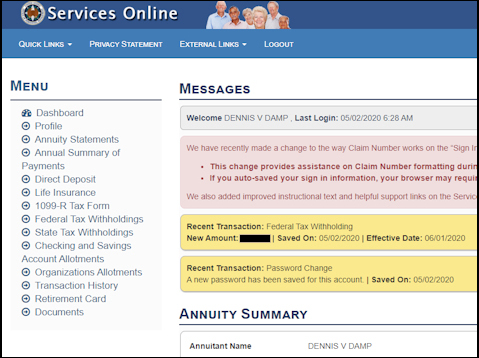
My Access Screen with Personal Data Removed
This change provides assistance on Claim Number formatting during site entry. When you first enter the site, you must add a prefix and suffix to your claim number. If you auto-saved your sign in information, your browser may require you to re-enter your Claim Number with this change. They also added improved instructional guides and helpful support links on the Services Online homepage and password reset pages.
Those who haven’t signed up for this service yet can review the signup procedures that are outlined in the article Herb Casey wrote on this subject several years ago.
I signed in this past weekend and was blocked from entry until I updated (changed) my password. I entered the password I have been using for the past year and then entered a new password to enter the site.
The dashboard page lists all recent transactions. In my case, I increased my federal income tax withholding and changed my password. It also lists your current annuity summary at the bottom of the page.
I requested an updated (current) retirement booklet. You can also request a copy of the original booklet that you received when your first retired. All retirees receive a comprehensive multi page booklet titled, “Your Federal Retirement Benefits” from OPM when they retire. My booklet was 28 pages long. Request your updated copy by selecting the Document Section, the last item listed on the Dashboard’s main menu and click on “Request Booklet.”
This booklet is a wealth of information and includes all of your personal retirement information such as your CSA number, annuity breakdown, survivor elections, benefit elections, etc. The document section also provides quick access to your 1099R forms for the past 5 years, a downloadable annual annuity statement and a how to guide if you are having trouble with your browser.
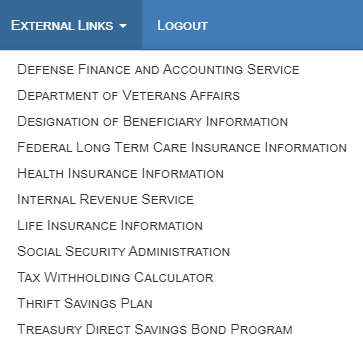
The site changes are helpful and there is a lot of information that you can download or print out for your records. The main dashboard page includes top menu selections for the following areas:
- Quick Links
- Forms
- FAQs
- Helpful Links
- Survivor Benefits
- External Links
The transaction History section is also useful. You can view all transactions for each month with a total year to date summary for each transactions type. All reports are easy to print out, just click on the print / PDF icon at the top right of the report being viewed.
Helpful Planning Tools
- 2020 GS Pay Scales
- Retirement Planning For Federal Employees & Annuitant
- Request Your Personalized Federal Retirement Report™ Today
- Financial Planning Guide
- Budget Work Sheet
- Medicare Guide
- Social Security Guide
- Master Retiree Contact List (Important contact numbers and information)
- 2020 Leave and Schedule Chart (Use this chart to set target retirement dates.)
- Annuity Calculator (FREE Excel chart estimates annuity growth)

Disclaimer: Opinions expressed herein by the author are not an investment or benefit recommendation and are not meant to be relied upon in investment or benefit decisions. The author is not acting in an investment, tax, legal, benefit, or any other advisory capacity. This is not an investment or benefit research report. The author’s opinions expressed herein address only select aspects of various federal benefits and potential investment in securities of the TSP and companies mentioned and cannot be a substitute for comprehensive investment analysis. Any analysis presented herein is illustrative in nature, limited in scope, based on an incomplete set of information, and has limitations to its accuracy. The author recommends that retirees, potential and existing investors conduct thorough investment and benefit research of their own, including detailed review of OPM guidance for benefit issues and for investments the companies’ SEC filings, and consult a qualified investment adviser. The information upon which this material is based was obtained from sources believed to be reliable, but has not been independently verified. Therefore, the author cannot guarantee its accuracy. Any opinions or estimates constitute the author’s best judgment as of the date of publication, and are subject to change without notice. The author explicitly disclaims any liability that may arise from the use of this material.
Last 5 posts by Dennis Damp
- Website Updates and New Ownership – Moving on, but Not Out - April 10th, 2026
- CSRS Retirees, Social Security Spousal Benefits Alert - April 3rd, 2026
- Retirement Credit Update for Federal Employees with Prior Military Service - March 27th, 2026
- Key Developments Affecting the Workforce - Weekly Update - March 20th, 2026
- Survivor’s Benefits for Federal Employee Spouses - March 13th, 2026
- Federal Employee News: 2026 Pay, Benefits, and More - March 6th, 2026
- Protecting Your Retirement Nest Egg – Fixed Income Update - February 26th, 2026
- Your 2026 Step-by-Step Federal Retirement Planning Guide - February 19th, 2026
- Online Retirement Application (ORA) Update - February 13th, 2026
- The End to the Silver Script Madness – News Flash - February 7th, 2026
- Reflections 2025 – Marvin Gaye (What’s Going On) - January 30th, 2026
- The Federal Workforce Data (FWD) Release – OPM Update - January 23rd, 2026
Posted in ANNUITIES / ELIGIBILITY, BENEFITS / INSURANCE, ESTATE PLANNING, FINANCE / TIP, RETIREMENT CONCERNS, SOCIAL SECURITY / MEDICARE, SURVIVOR INFORMATION | Comments (0)
Print This Post


